Hot Poddy
Menu

Closed test · Android 12+

One calm feed. A short queue. Ready offline.

Hot Poddy is a focused Android podcast player built around the way I wanted to listen: new episodes together, the next few listens chosen deliberately, and downloads already on the phone. There is no Hot Poddy account, advertising or cloud sync.

Android 12+ · No account · No ads · No cloud sync

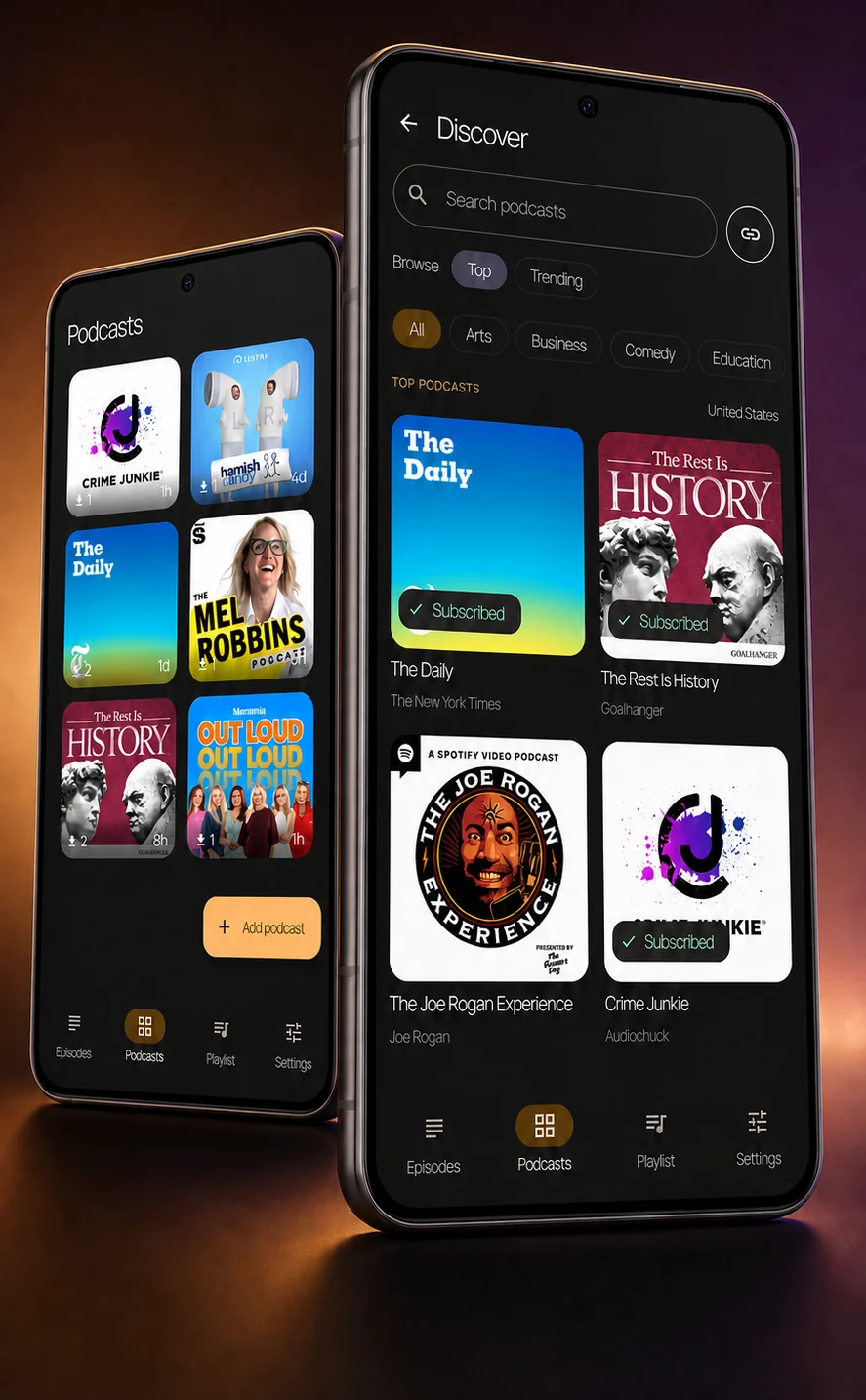
Two Android phones showing Hot Poddy podcast discovery and a six-show library

Why I built it

I wanted a podcast app that matched the way I actually listen.

I tried a number of good podcast apps on Android, but none quite settled into the workflow I wanted. I wanted to open the app and immediately see the latest episodes from the shows I follow. I wanted the ones I chose to be on my phone before I left home, a short queue for what I actually planned to hear, and a storage limit that looked after itself.

Hot Poddy is the result. I am not trying to build a better podcast app for everyone. The goal is to make one focused workflow work well, then find out whether it is preferable for some other people too.

How it works

From finding a show to pressing play.

The main path is deliberately short. Find the shows you want, scan one episode feed, choose the next few things to hear and let Hot Poddy keep them ready.

Step 01 · Find and follow

Find a show without committing first.

Search by name, browse top and trending podcasts, or add an RSS feed directly. Open a preview to inspect a show before following it.

  • Search and browse are a way into direct podcast feeds, not a separate content service.
  • OPML import is available for an existing podcast library.
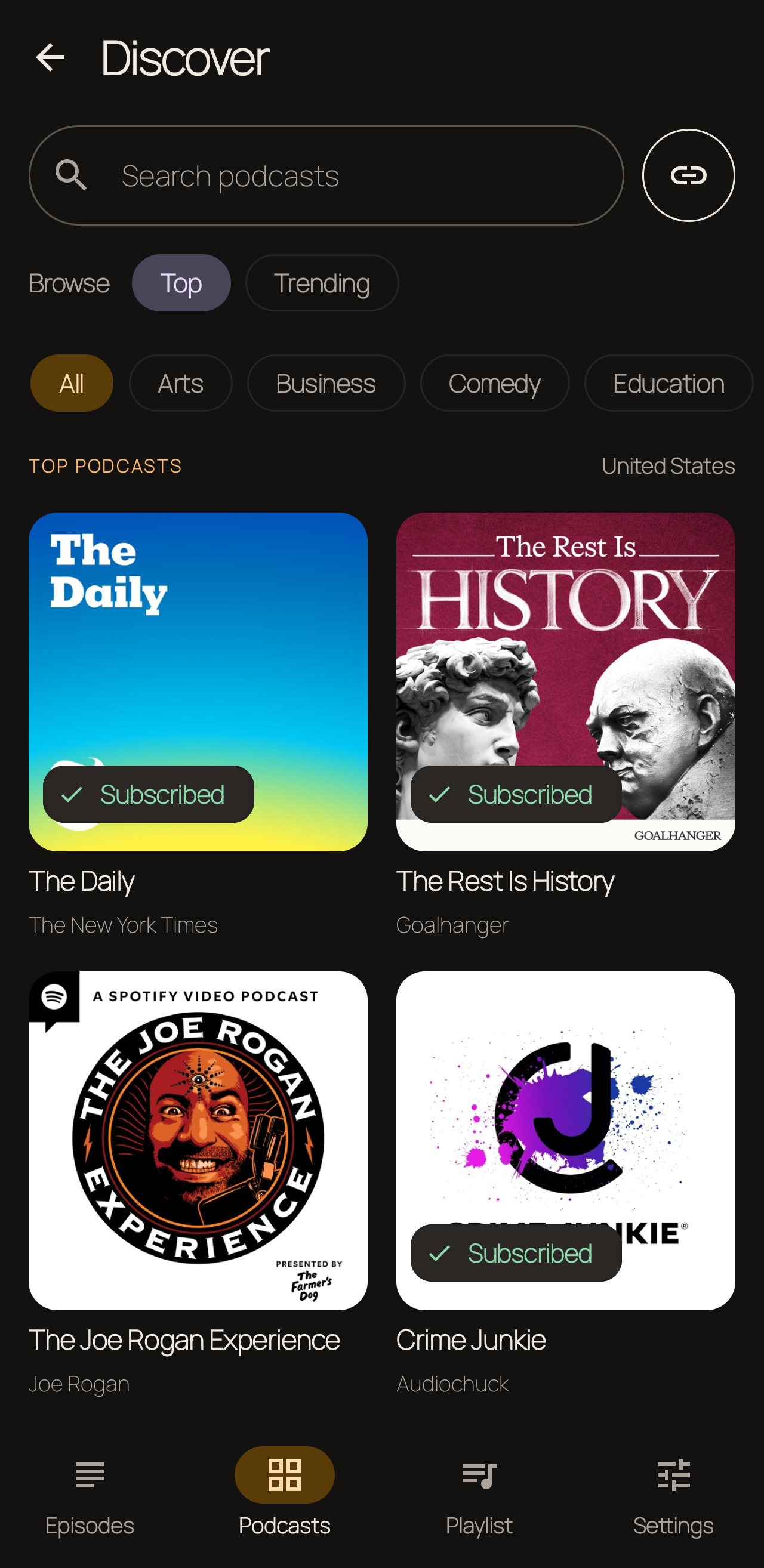
Discover screen with podcast search, Top and Trending filters, and followed-show states
Discover: browse, search or inspect a feed before following.

Step 02 · One feed, already downloaded

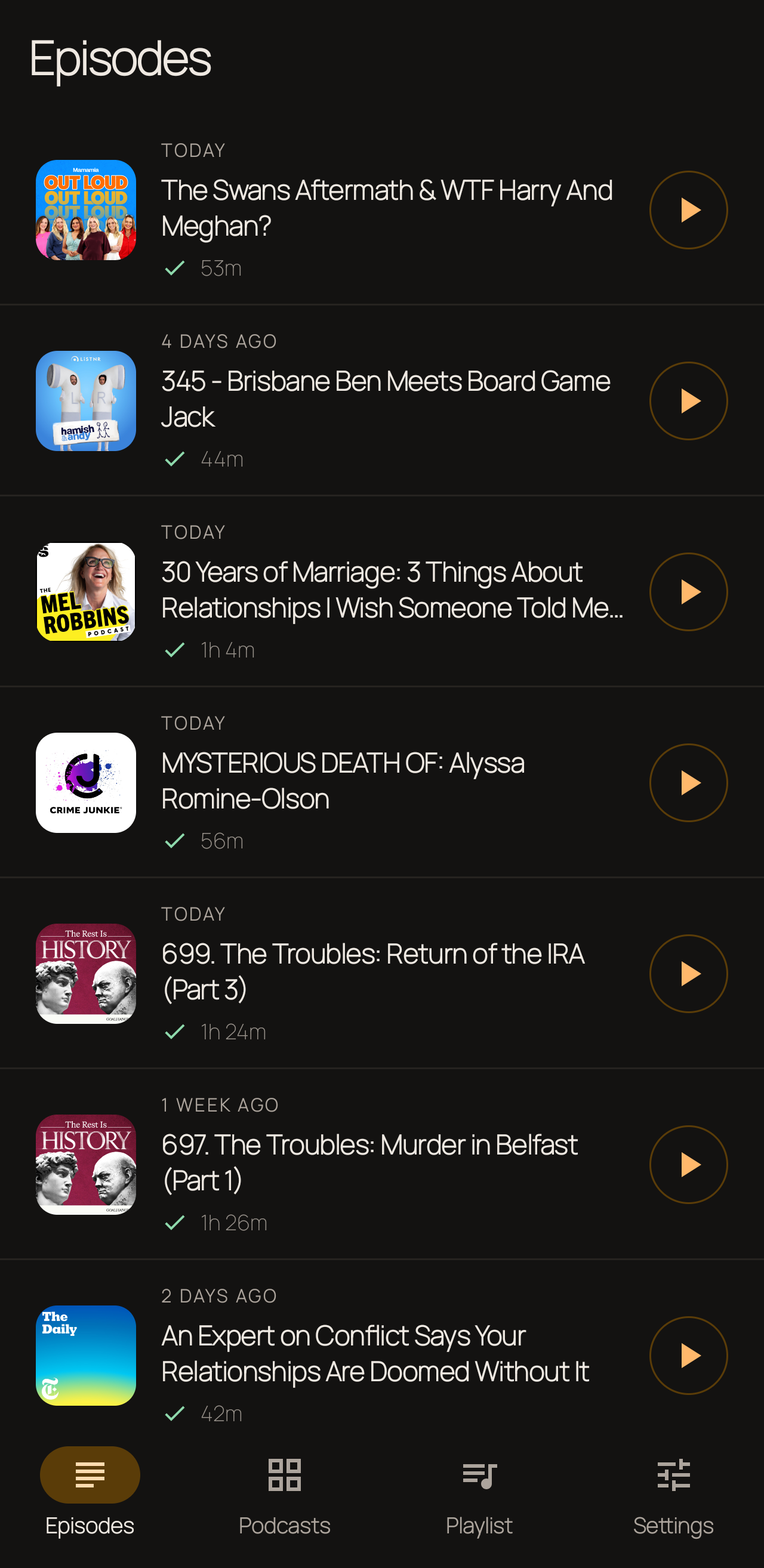
New episodes arrive in one place.

Episodes from every followed show appear together. Hot Poddy can check in the background and download new episodes over Wi-Fi or mobile data, so listening does not depend on the connection being good later.

  • Clear downloaded, queued and playing states.
  • Resume position is saved on the phone.
Episodes screen combining new releases from followed shows with downloaded-state indicators
Episodes: one chronological view across every followed show.

Step 03 · Pick the next few

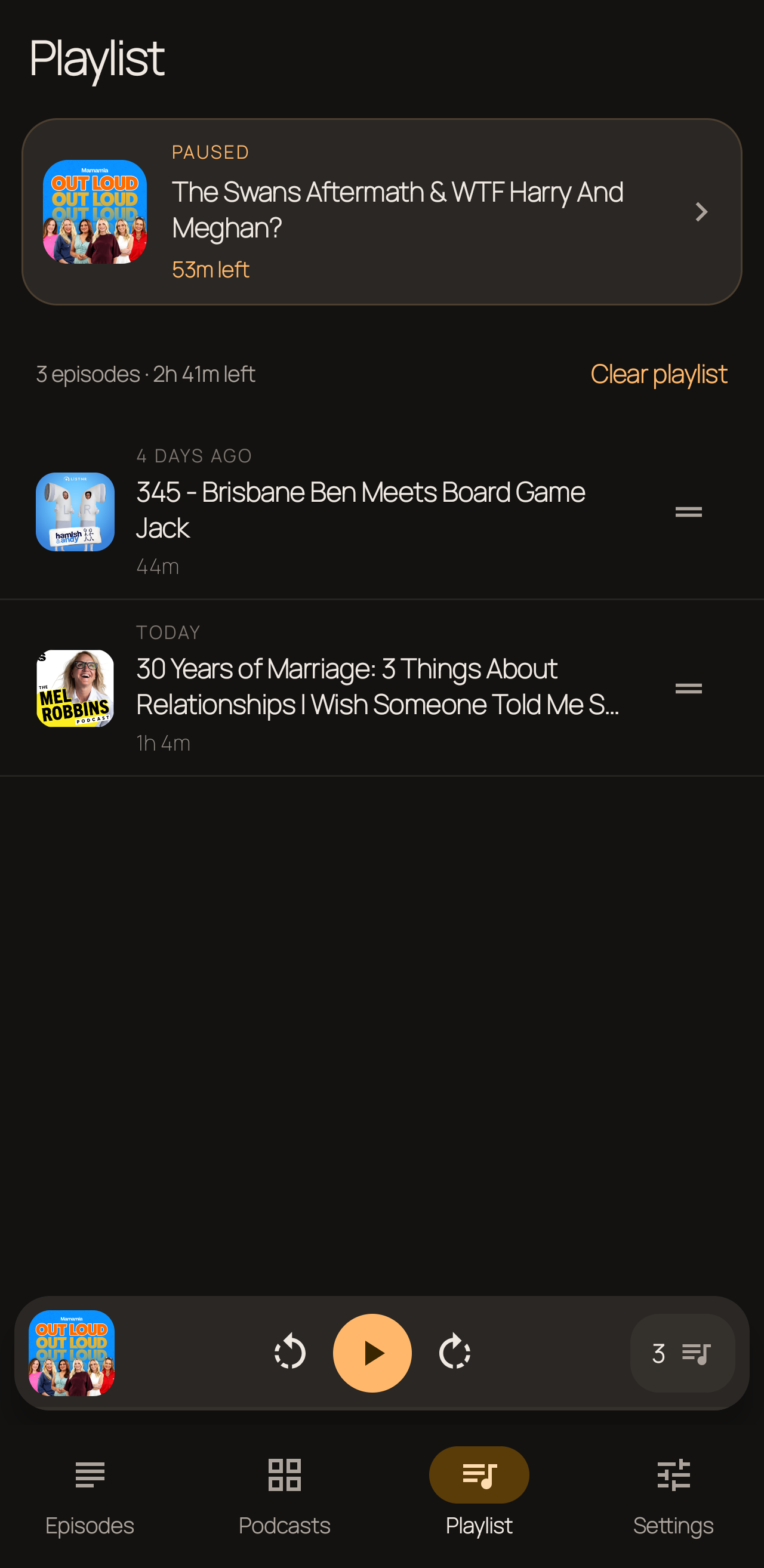
Keep a short playlist, not an obligation.

Add the episodes you genuinely plan to hear next, put them in order and remove them when the plan changes. The playlist is intentionally manual. It is there to make the next choice smaller, not to preserve an infinite backlog.

  • Drag to reorder.
  • Clear the queue explicitly when starting again.
Playlist screen with one paused episode, two up-next items, reorder handles and a clear action
Playlist: the current episode and only the next few listens.

Step 04 · Listen and manage storage

The usual listening controls, without the storage surprise.

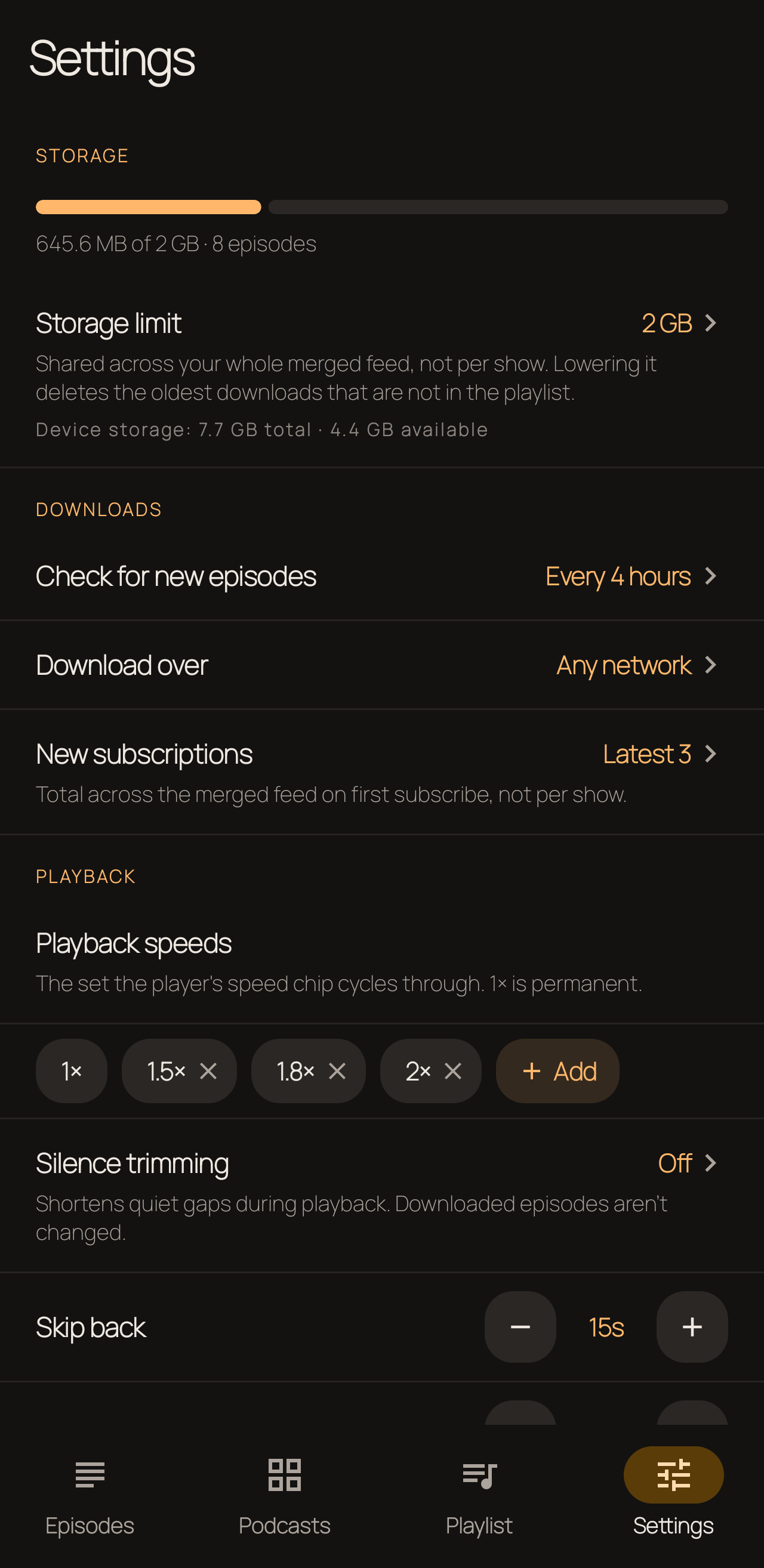
Change playback speed and skip amounts, trim silence, set a sleep timer and use show notes, publisher chapters or transcripts when available. A storage ceiling keeps downloaded audio within the chosen limit by cleaning up older episodes that are no longer in the playlist.

  • Notification, lock-screen and Bluetooth controls.
  • Configurable polling, network and storage limits.
  • Explicit backup/restore and OPML import/export.
Settings screen showing storage limits, download networks, playback speeds, silence trimming and skip controls
Settings: explicit controls for downloads, storage and playback.

Deliberately focused means leaving some things out.

Hot Poddy is for one-device Android listening. It favours one feed and a short manual playlist over cross-device sync and extensive organisation. That will be a benefit for some listeners and a poor fit for others.

Likely to suit

  • Android listeners who want episodes ready offline.
  • People who prefer choosing the next few listens to maintaining a backlog.
  • People who want no Hot Poddy account, ads or cloud-sync service.

Not currently built for

  • iOS, web or desktop listening.
  • Cross-device library or playback sync.
  • Chromecast, first-class Android Auto or Wear OS.
  • Large folder, filter or automation systems.

Your library stays under your control

No Hot Poddy account or cloud sync.

Subscriptions, downloads and listening history are held in the app's private storage on the phone. Hot Poddy does not send that library to Soldier Software. Podcast hosts and directory providers still receive the normal requests needed to find and play podcasts. Android may include library data and settings in encrypted device backup, and optional crash diagnostics can be switched off in Settings.

Read the privacy policy

Closed testing on Google Play

Help me test the workflow, not just the buttons.

Join the test in two steps

  1. Step 1

    Join the Hot Poddy Google Group

    Join with the Google Account you use in the Play Store. Group membership gives that account access to the closed test.

    Join the Google Group
  2. Step 2

    Opt in and download from Google Play

    After joining the group, open the Google Play testing page with the same account, become a tester and install Hot Poddy.

    Get Hot Poddy on Google Play

You need to join the Google Group before Google Play will offer the test.

I have used Hot Poddy for my own listening, and it is now ready for a small number of other people to use properly. I am looking for Android listeners willing to try it as their normal podcast app for about a week and tell me where the workflow becomes confusing, restrictive or unreliable.

Android 12+ · About one week of normal listening